

User Researcher & Designer
Global Digital Experience Team
2018-2019

HP.COM
B2B Landing Page Design Empowered by User Research
I was a Hybrid User Researcher & UX Designer at HP shop website team
As a hybrid user research and UX designer in HP.com org, I worked in a team of 3 UX Researchers/Desigeners to support user research needs for the entire creative design team. During 9 months, apart from designing and prototyping for multiple projects, I spent 80% of my time planning and conducting benchmark research and usability testing sessions for multiple projects and presented testing results and design recommendations across multidisciplinary teams. My research provided insights to help our team iterate or finalize designs and even initiate new projects.

Moderated large scale benchmark research through the overall B2B website pages.

2 rounds of unmoderated usability testings for the global new homepage ( pre-launched in Canada)

Prototyped and unmoderated usability testing for OfficeJet Pro (printer for small business) landing page.
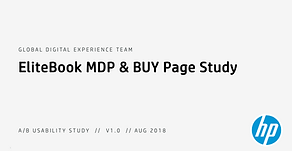
A/B testing follow up usability testing for more supporting data.

Lean usability testing for comparison tool on HP store website.

B2B printer gateway redesign project initiated from benchmark study
My user testing process
We utilized usertesting.com to eliminate time and geographic limits and ensure accurate participants recruitment for every research project. I'm not going to share details of these projects but here's the snapshot of my user testing process.


1. Define the research objects and methods.
Understand the objects, goals, and KPIs for the research to kick off and keep everyone involved in the project on the same page.
- Remote testing
- Moderate/unmoderated sessions
- Between subjects A/B testing
- Balanced A/B testing
- Same tasks for each participant group
- Etc.
2. Prepare testing materials
Besides live websites, we also use high-fidelity prototypes or a combination of these 2 in (lean) user testing sessions. I collaborated with visual designers and worked on prototyping to make sure everything needed for testing was ready.


3. Define participants demographics and segmentations
B2B/B2C, Gender, age, location, income, web expertise, device, employment status, industry, business size, job title and responsibility (end users / decision-maker), online shopping experience, electronics shopping frequency, product types, etc.
4. Plan out natural user flow
Users usually come to a website with a specific goal. To ensure the reliability of testing results, I plan out user flow to guarantee natural user web browsing behavior as if they would have in real life.



5. Testing script and task flow
Onboarding users with the testing goal, duration, product/prototype they will be using. Encourage them to think aloud and share their opinion comfortably. Set up task flows, urls, balanced test mode for version comparison, open-ended questions, and measurements.
6. Review testing recordings
After launching the study, users' reactions and user behaviors can be so different from each other while patterns show up too. I gathered insights by reviewing and annotating all testing sessions and making highlight reels for internal sharing. I also invited designers involved in the project to this part to help to build up empathy.



7. Synthesis results
- Insightful user quotes.
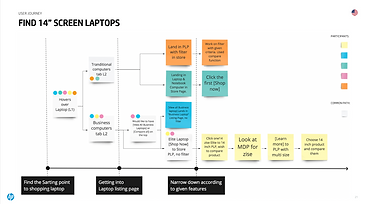
- User flow / mental model for each task.
- Average time for each task.
- Task successful rate.
- How easy/hard it is for each task.
- Average No. of clicks for each task.
- Average No. of back and forth.
- Quantify the overall impression users have for specific designs.
- Engagement rate (usefulness vs. awareness rate).
- Feature/story recall success rate.
- Preference for A/B versions.
- System usability scale.
- Etc.
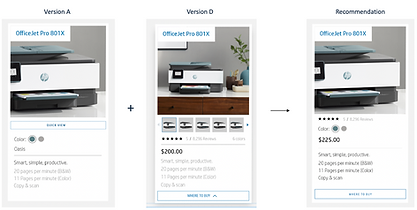
8. Visualize recommendations
As a hybrid UX researcher/designer, and the one who knows users the most in the team, I also provide improvement recommendations in my research deliverables.

9. Present research findings
Present research findings and design recommendations to stakeholders and team members involved in different projects across the world.
The Problem
In a bench study, B2B printer gateway page has low performance
My manager and I initiated this project from the large-scale moderated benchmark study where we had a series of tasks to evaluate the B2B consumer experience and website perfermance. We focused on the B2B printer gateway to streamline the user funnel and maximize impact, aiming for a launch in 3 months.
With engagement lead, stakeholders, and marketing strategists, we aimed to reduce the number of back-and-forths, boost B2B consumers' confidence, and improve the B2B printer shopping experience.


None participants fully success in task 4: finding a specific business printer. Lower score for printer-related tasks
User Mental Model Analysis
Painful back & forth clicking process challenges users' patience
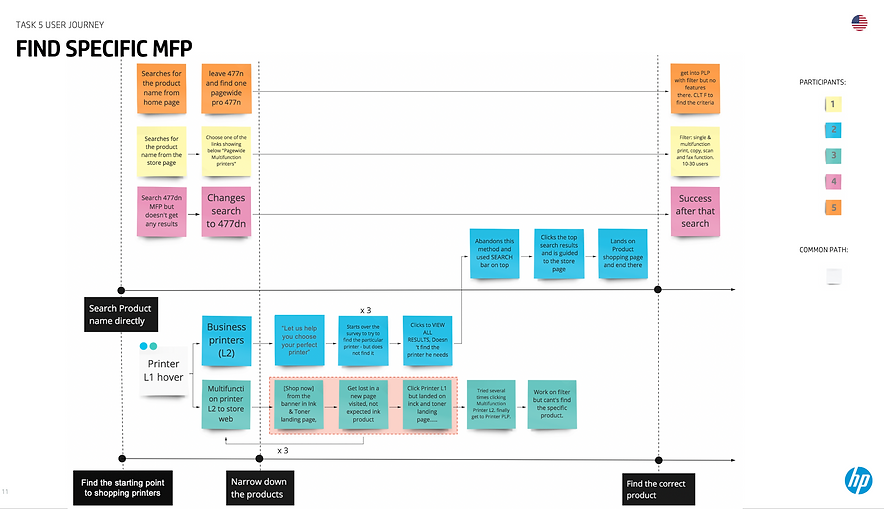
During the testing, participants had a really hard time finding printers that meet specific needs with lots of painful starting over as well as back and forth between marketing and store websites. It was also challenging for them to compare printer models in marketing and store websites. It's very likely that they will quit in real user scenarios. B2B printer searching and shopping experience on hp.com need to be improved thoroughly.


I mapped out user path and user mental model to spread empathy through the team
Confidence of choosing comes from comparison
I conducted a high-level content audit and found out that more high-level information for each printer is buried in the next level page. If we can bring more information up to the gateway page to better educate users about HP printer families, they should be more confident to choose the one that most likely meets their needs and reduce back and forth.
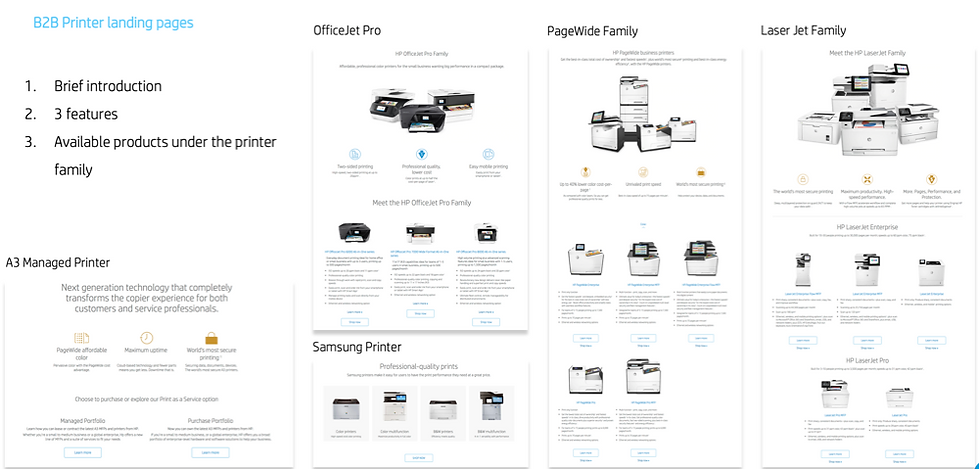

Stakeholders were pretty excited about it!
Our stakeholders (Managers of each printer family) and marketing team are located in different parts around the world. We had rounds of workshops every week to:
1. learn how our competitors are differentiating their product lines at this high level,
2. Learn how much we want to differentiate each printer family, the potential traffic change to each printer family,
3. Discuss future strategy and content change for different printers.
With lots of uncertainty, we decided to have a baby step first, adding more feature descriptions to each printer family on this page.
Final Imapct
I supported another team with a similar proposal to streamline the business laptop gateway page
During the second month, we were informed the laptop team had a very similar design for the laptop gateway page and was actively planning to test in the German Area. I further shared my research findings and wireframe proposal with them to consolidate that they are moving in the right direction. We then decided to pause the exploration of the printer gateway. So with the priority shifting, the printer gateway redesign project went into a slow phase until I left HP. The good news is the laptop gateway design is now alive in the United States Area :)


Business laptop gateway page, Credit to Michelle Nam
Takeaway
I don't think I've learned too much !
During the 9 months at HP as a hybrid UX researcher and designer, I've seen the power of usability testing supporting design and the whole team to move forward in a better direction at the enterprise level. This experience helped me better understand the data-driven design approach, shaped a new perspective of empathy for broad groups of users, better consider usability through the design process, and keep an open mind with my design.
1. Communication is the key to work in an enterprise company.
2. User behaviors can vary a lot while patterns show up too. Need to have strong empathy to understand the reason behind their complaints and suggestions, and balance what's important to report.
3. Working close with marketing team and stakeholders helps me better understand the balance between the business goal and design.
4. A good design needs validation not just from usability testing but also by KPIs.
5. When given a bunch of requirements, ask questions and understand whether the features are what users really need.

516.647.7628
© 2018 - 2024 Lovely designed by Nichole Tian. All rights reserved.